# funModelling will be used for rapid Exploratory Data Analysis
pacman::p_load(sf, tidyverse, tmap, spdep, funModeling)In-Class Exercise 2
Published on: 27-Nov-2022
(First published on: 26-Nov-2022)
Whether water points with the same status co-occur geographically in Nigeria
(Note: The following was part of an in-class exercise for ISSS624 conducted on 26 Nov 2022).
1.1 Overview
To prepare for the Take-home Exercise 1, which examines the spatial patterns of functional and non-functional water points (wp) in Nigeria
Learn how to:
Import raw Geospatial Data downloaded from the Internet
Perform data wrangling for spatial pattern analysis
1.2 Import and load the appropriate packages into R environment
1.3 Import the Geospatial Data
2 geospatial data sets are used for this exericse:
geo_export: This contains information on the water points in Nigeria
nga_lga2: This contains Nigeria Level-2 Administrative Boundary (also known as Local Government Area) polygon features GIS data
1.3.1 Import water point geospatial data
wp = st_read(dsn = "In-Class_Ex2/geodata",
              layer = "geo_export",
              crs = 4326) %>%
  filter(clean_coun == "Nigeria")
Next, write_rds() of readr package is used to save the extracted sf data table (i.e. wp) into an output file in rds data format. The output file is called wp_nga.rds and it is saved in geodata sub-folder.
write_rds(wp, "In-Class_Ex2/geodata/wp_nga.rds")1.3.2 Import Nigeria LGA boundary data
nga = st_read(dsn = "In-Class_Ex2/geodata",
               layer = "nga_lga2",
               crs = 4326)
2.1 Data Wrangling
2.1.1 Recode NA values into string
First, we do a count of the values in the status_cle column in the imported wp dataset
wp_nga = read_rds("In-Class_Ex2/geodata/wp_nga.rds")

freq(data=wp_nga,input = 'status_cle')
We use the replace_na() method to recode all the NA values in status_cle field into Unknown
wp_nga = wp_nga %>%
  mutate(status_cle = replace_na(status_cle, "Unknown"))
2.2 Extract functional water points
In the code chunk below, filter() of dplyr is used to select functional water points.
wpt_functional = wp_nga %>%
  filter(status_cle %in%
           c("Functional",
             "Functional but not in use",
             "Functional but needs repair"))
2.3 Extract non-functional water points
wpt_nonfunctional = wp_nga %>%
  filter(status_cle %in%
           c("Abandoned/Decommissioned",
             "Abandoned",
             "Non-Functional",
             "Non functional due to dry season",
             "Non-Functional due to dry season"))
2.4 Extract water points with Unknown value
wpt_unknown = wp_nga %>%
  filter(status_cle == "Unknown")
2.5 Perform Point-in-Polygon Count
We use st_intersects to compute the number of functional, non-functional and unknown wps in each LGA.
nga_wp = nga %>%
  mutate(`total wpt` = lengths(
    st_intersects(nga, wp_nga))) %>%
  mutate(`wpt functional` = lengths(
    st_intersects(nga, wpt_functional))) %>%
  mutate(`wpt non-functional` = lengths(
    st_intersects(nga, wpt_nonfunctional))) %>%
  mutate(`wpt unknown` = lengths(
    st_intersects(nga, wpt_unknown)))
2.6 Save the data table for spatial analysis
We derive two fields namely pct_functional and pct_non-functional using the mutate() of dplyr package. To keep the file size small, we use select() of dplyr is used to retain only columns 3,4,9,10, 18,19,20,21,22,and 23.
nga_wp = nga_wp %>%
  mutate(pct_functional = `wpt functional`/`total wpt`) %>%
  mutate(`pct_non-functional` = `wpt non-functional`/`total wpt`) %>%
  select(3:4, 9:10, 18:23)
Thereafter ,we save the tidied sf data table into rds format for our spatial analysis
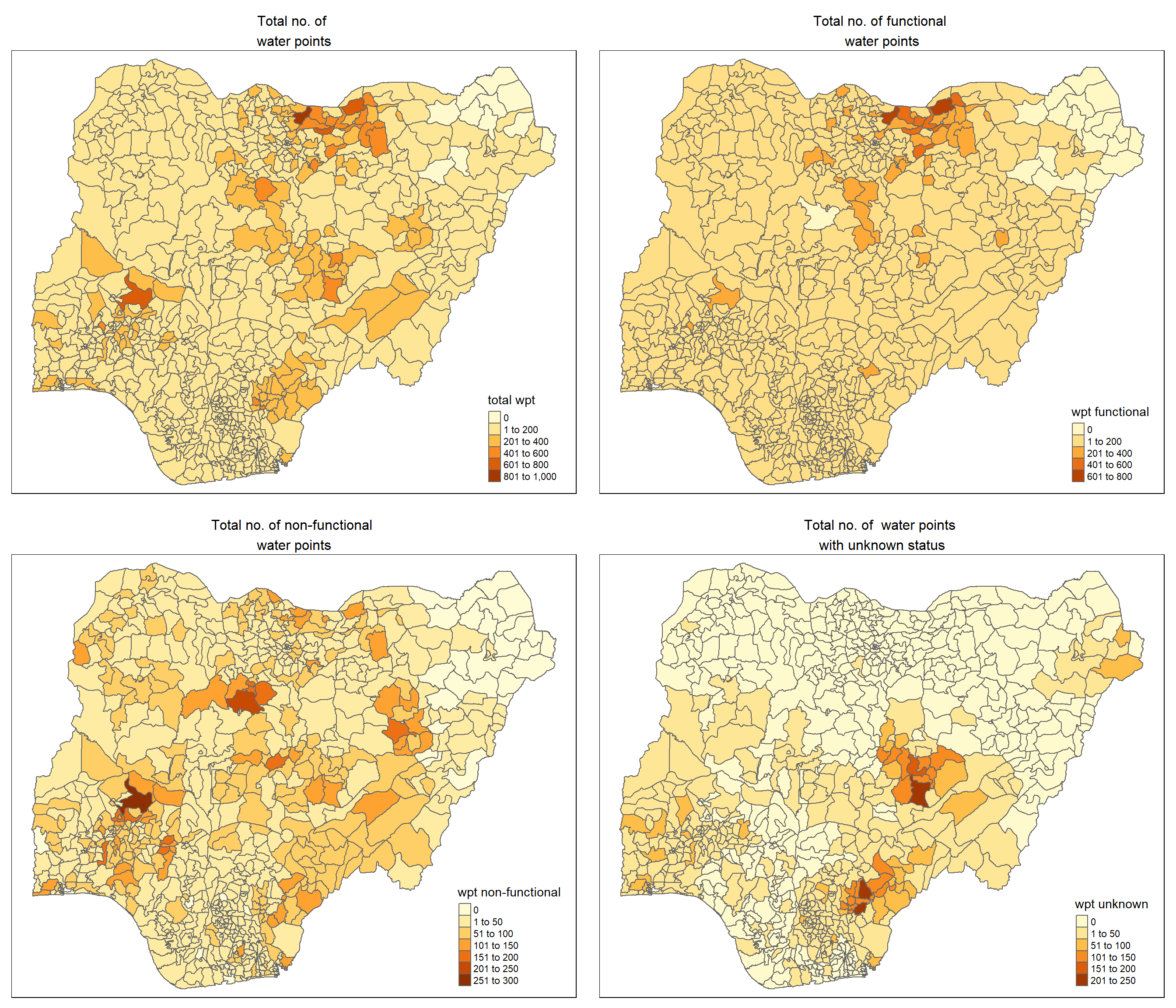
write_rds(nga_wp, "In-Class_Ex2/geodata/nga_wp.rds")2.7 Visualise the spatial dsitribution of water points
# Load the nga_wp sf data file prepare in the previous steps
nga_wp <- read_rds("In-Class_Ex2/geodata/nga_wp.rds")

# Plot the various types of water points
total = qtm(nga_wp, "total wpt") +
        tm_layout(main.title = "Total no. of \nwater points",
                  main.title.position = "center",
                  main.title.size = 1.0,
                  legend.height = 0.26,
                  legend.width = 0.40)

wp_functional = qtm(nga_wp, "wpt functional") +
                tm_layout(main.title = "Total no. of functional \nwater points",
                  main.title.position = "center",
                  main.title.size = 1.0,
                  legend.height = 0.26,
                  legend.width = 0.40)

wp_nonfunctional = qtm(nga_wp, "wpt non-functional") +
                tm_layout(main.title = "Total no. of non-functional \nwater points",
                  main.title.position = "center",
                  main.title.size = 1.0,
                  legend.height = 0.26,
                  legend.width = 0.40)

unknown <- qtm(nga_wp, "wpt unknown") +
                tm_layout(main.title = "Total no. of  water points \nwith unknown status",
                  main.title.position = "center",
                  main.title.size = 1.0,
                  legend.height = 0.26,
                  legend.width = 0.40)

tmap_arrange(total, wp_functional, wp_nonfunctional, unknown, ncol=2)